Cloud macOS hosting provides a flexible way to build, test, and release applications for Apple devices. A reliable CI/CD pipeline needs a suitable build environment to complete these tasks. The choice between temporary and long-running environments affects build speed, security, maintenance, and operating costs. Understanding Ephemeral vs. Persistent build environments helps DevOps teams select a setup that matches project requirements. A suitable choice also supports consistent software delivery.
What Are Ephemeral and Persistent Build Environments?
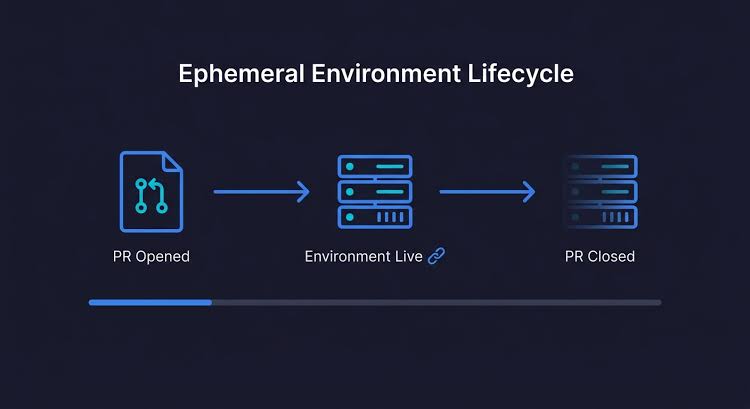
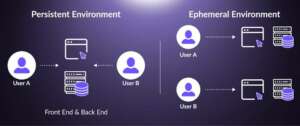
An ephemeral build environment is created for a specific job or a short period. Once the job finishes, the environment is removed or reset. This approach provides a clean workspace for each build and reduces problems caused by old files or previous settings.
A persistent build environment remains available for repeated jobs. Installed tools, cached files, and selected settings can stay on the machine between builds. This setup can reduce preparation time because essential development tools do not need to be installed again for every job.
Understanding Ephemeral vs. Persistent environments starts with recognising the difference between temporary resources and reusable infrastructure. Both options support cloud macOS development, but each offers different benefits. The decision should reflect workload requirements and the level of maintenance available.
The Ephemeral vs. Persistent approach helps development teams understand how temporary and reusable resources affect daily build operations.
How Ephemeral Build Environments Work
Ephemeral environments start with a prepared configuration. A CI/CD system creates or assigns a clean environment when a new job begins. The pipeline downloads source files, installs required dependencies, runs tests, and produces build results. After completion, the temporary environment is removed or returned to a clean state.
This process limits the effect of leftover files and unexpected settings. A failed job is less likely to affect a later build when each job receives an isolated workspace. The approach is useful for pull requests, automated testing, and release tasks that require strong separation.
For Ephemeral vs. Persistent workflows, temporary environments offer better isolation when jobs process code from different branches or contributors. However, environment preparation can increase build time. Required tools and dependencies may need to be downloaded or configured again. Automated provisioning can reduce this delay.
A clear Ephemeral vs. Persistent strategy makes it easier to manage clean workspaces and reduce unwanted files between automated jobs.
How Persistent Build Environments Work
Persistent environments use the same cloud Mac or runner for multiple jobs. Xcode, development libraries, package managers, and other tools can remain installed between sessions. Local caches can also reduce repeated downloads and compilation work.
This setup is suitable for teams with frequent builds and stable development requirements. A persistent Mac Mini can support continuous integration jobs without rebuilding the entire environment every time. Long-running services and specialised development tools can remain ready for use.
In an Ephemeral vs. Persistent comparison, persistent environments often provide faster repeat builds when useful caches are maintained. However, old files, outdated software, and incorrect settings can affect later jobs. Regular cleanup and maintenance are necessary to keep results reliable. Scheduled checks can identify these problems before they interrupt development.
The Ephemeral vs. Persistent decision becomes important when repeated builds require stable tools and reliable access to cached dependencies.
Key Differences Between Both Environments
The main difference in Ephemeral vs. Persistent build environments is how resources and settings are handled after each job.
Ephemeral environments prioritize clean starts and job isolation. Persistent environments prioritize reuse and convenience. Temporary environments may require more setup time, while persistent environments need stronger ongoing maintenance.
Security is another important consideration. A fresh environment can reduce the risk of data or credentials remaining after a job. A persistent machine requires careful access controls and removal of sensitive files. Neither approach guarantees security without suitable configuration.
Cost also depends on workload patterns. Temporary resources can reduce unnecessary running time when provisioning and cleanup are automated. Persistent machines can offer better value when builds run frequently and the hardware remains busy.
A practical Ephemeral vs. Persistent comparison should consider setup time, security requirements, maintenance effort, and overall resource usage.
Choosing the Right Environment for Cloud macOS
The best choice depends on build frequency, project size, security needs, and available resources. Teams should evaluate Ephemeral vs. Persistent options based on actual pipeline requirements rather than assuming one approach always performs better.
Ephemeral environments suit short-lived testing jobs, pull requests, and tasks involving untrusted code. Each job starts from a controlled baseline. This reduces the chance of previous work affecting a new result.
Persistent environments suit frequent builds, shared development tools, and workloads that benefit from local caches. A dedicated cloud Mac can also support interactive debugging and longer testing sessions.
For Apple platform projects, the choice of environment must also account for Xcode versions, macOS compatibility, code-signing requirements, and simulator availability. Further guidance on running simulators remotely is available in this guide to using an iOS Simulator on a cloud-hosted Mac.
The Ephemeral vs. Persistent decision should also consider whether builds need specialized software or stable machine settings. Teams with strict testing requirements may prefer clean environments for final verification. Projects with repeated development builds may benefit from reusable resources.
Improving Build Speed and Reliability
A good CI/CD strategy should measure build duration, queue time, failure rates, and resource usage. These measurements help identify whether environment setup or application compilation causes delays.
For Ephemeral vs. Persistent pipelines, dependency caching can improve performance when cache contents are verified and updated correctly. Shared caches should not allow one job to change files used by unrelated jobs without proper controls.
Build teams should also define standard environment settings. Consistent Xcode versions, dependency versions, and build configurations reduce unexpected differences between runs. Build artifacts should be stored separately from temporary workspaces so successful outputs remain available after cleanup.
Persistent runners need scheduled updates and routine checks. Ephemeral runners need reliable provisioning and automatic removal. Both setups require clear logs and failure alerts to support troubleshooting.
When comparing Ephemeral vs. Persistent performance, teams should measure complete pipeline time rather than focusing only on compilation. Environment creation, dependency installation, testing, and cleanup all affect the final result.
Reviewing Ephemeral vs. Persistent performance regularly helps identify delays and improve the efficiency of cloud macOS pipelines.
Security and Maintenance Best Practices
Security controls should match the risks of each workload. Access to cloud Mac systems should use strong authentication and limited permissions. Credentials should be stored securely rather than written into source files or build logs.
For Ephemeral vs. Persistent security planning, temporary environments can reduce the period during which job data remains on a runner. Persistent environments need additional controls to separate jobs and remove sensitive information after use.
Official guidance on GitHub Actions self-hosted runners and autoscaling provides useful information for managing runner capacity. The same planning principles can help teams design safer automated build workflows.
Maintenance should include reviewing installed tools, checking available storage, monitoring resource usage, and testing recovery procedures. Teams should confirm that cleanup processes work correctly before relying on automatic environment removal.
The Ephemeral vs. Persistent approach should also define clear rules for storing logs and build artifacts. Temporary workspaces should not become the only location for important outputs. Persistent machines should be checked for unused files and outdated dependencies.
Using a Hybrid Build Strategy
A hybrid setup combines ephemeral and persistent environments within one CI/CD pipeline. Persistent cloud Macs can handle frequent development builds and jobs that benefit from cached dependencies. Ephemeral environments can handle isolated tests, pull requests, and sensitive release operations.
This model allows teams to balance performance with security. Job routing rules can assign each task to an appropriate runner based on its requirements. Separate permissions and storage policies help prevent unwanted access between workloads.
When evaluating Ephemeral vs. Persistent approaches, a hybrid model can be practical for growing projects with different build needs. Regular performance reviews help determine whether runner capacity or workflow design needs improvement.
The Ephemeral vs. Persistent strategy can change as a project grows. A small team may begin with one persistent cloud Mac for daily development. Additional ephemeral runners can be introduced when testing demand increases or stronger job isolation becomes necessary.
A hybrid arrangement also helps control resource usage. Frequently used tools can remain available on persistent machines while temporary runners handle occasional workloads. This structure supports flexibility without requiring every build to use the same environment.
The Ephemeral vs. Persistent model can support different workloads by combining reusable build resources with temporary environments for isolated tasks.
Conclusion
Selecting the right cloud macOS build environment is an important part of reliable CI/CD automation. Ephemeral environments provide clean workspaces and stronger job separation. Persistent environments offer reusable tools and potentially faster repeat builds.
A clear understanding of Ephemeral vs. Persistent environments helps DevOps teams make informed decisions about security, performance, and resource management. A hybrid strategy can combine the strengths of both approaches while supporting dependable Apple application development.