A shared Mac server provides a central environment for developers working on iOS, macOS, Flutter, and React Native projects. Several projects can require different development tools and software versions. Managing Xcode and Node.js Versions correctly helps prevent compatibility problems and keeps development work organised.
Xcode provides tools for building, testing, and debugging Apple applications. Node.js supports JavaScript tools and development packages used by many modern applications. Both tools may need different versions depending on project requirements. A clear management plan helps a team maintain reliable builds without unnecessary changes to the shared server. Managing Xcode and Node.js Versions from the beginning helps establish a stable environment for every project.
Why Version Management Matters
Different projects often depend on different software versions. An older iOS application may require an earlier Xcode release. A newer application may need an updated version to support recent Apple development tools. JavaScript frameworks can also depend on particular Node.js releases. Different requirements make Xcode and Node.js Versions an important consideration when preparing a shared development environment.
Poor management of Xcode and Node.js Versions can cause build failures and unexpected errors. A project that works correctly in one environment may fail in another because of incompatible tools. These problems can delay testing and make it difficult to identify the real cause of an error.
A shared Mac server requires additional care because several developers use the same machine. One person’s software changes may affect another project if the development environment is not properly separated. A consistent version policy reduces these risks and supports smoother teamwork.
Managing Multiple Xcode Installations
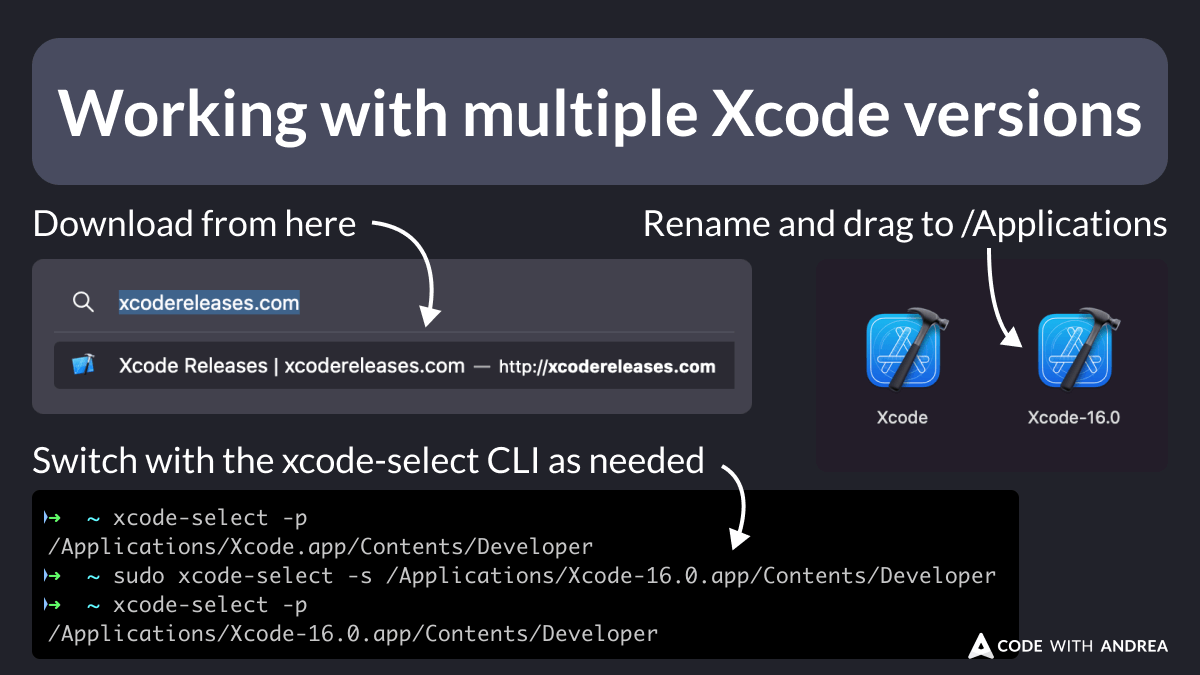
Apple allows multiple Xcode applications to be installed on a Mac when the available storage and system requirements permit it. Each installation can be given a clear name to identify its release. For example, separate application names can distinguish a stable release from a version used for testing.
Managing Xcode and Node.js Versions starts with recording the Xcode release required by each project. The team should check the macOS compatibility requirements before installing another release. Older Xcode versions may not work with newer macOS releases, so compatibility checks are important. Recording Xcode and Node.js Versions for each application helps prevent developers from selecting an incompatible development tool.
The active developer directory also needs attention. The macOS command-line tools can point to a particular Xcode installation. Changing this selection may affect builds started from the terminal. A team member should verify the active installation before starting a build. Teams should document approved Xcode and Node.js Versions so developers can identify the correct environment without unnecessary guesswork.
Developers should avoid changing the active Xcode selection during another person’s build. A shared schedule or agreed maintenance period can reduce interruptions. Each project should also document the required Xcode release and supported iOS SDK.
Managing Multiple Node.js Versions
Node.js version management is important for projects built with JavaScript frameworks and related tools. Different applications may require different Node.js releases because of package compatibility or framework requirements. Documenting Xcode and Node.js Versions alongside framework requirements makes project setup easier to repeat.
A version manager such as NVM can help organise Xcode and Node.js Versions across development projects. NVM supports installing and switching between Node.js releases on macOS. Its project-specific configuration also helps developers select the intended version. The NVM documentation explains installation and version management.
On a shared Mac server, NVM normally manages Node.js installations for an individual user account. Each developer should have a suitable environment rather than assuming that a version installed for one account is automatically available to every other account. Regular checks of Xcode and Node.js Versions help keep dependencies aligned with the needs of each project.
Project configuration files can record the required Node.js release. A .nvmrc file is one option for this purpose. The team can document the required package manager and dependency installation process alongside the version information.
Keeping Project Environments Separate
Clear separation is essential when multiple projects share one machine. Each project should maintain its own source files, dependencies, and configuration records. This approach reduces the risk of one application affecting another application. Separating project settings helps ensure that Xcode and Node.js Versions remain suitable for each application’s requirements.
Managing Xcode and Node.js Versions becomes easier when project requirements are written down before development begins. A shared record can include the Xcode release, Node.js release, macOS requirements, framework version, and testing requirements.
Separate user accounts can provide better boundaries between developers. Appropriate permissions should control access to project files and shared resources. A common software directory may hold approved installers, while individual development environments remain separate.
Teams should also avoid unnecessary global package changes. A package installed for one Node.js version may not be available after switching to another version. Project-specific dependencies and documented installation steps help maintain consistent results.
Establishing a Team Version Policy
A version policy explains how software versions are selected, updated, and maintained. The policy should identify approved releases and specify who can install or remove development tools. The policy should explain how Xcode and Node.js Versions are approved, recorded, and updated across the team.
For Xcode and Node.js Versions, the policy should include a compatibility record for every active project. Developers can check this record before starting a new task. The record should be updated whenever a project adopts a new framework or development tool.
Updates should be tested before becoming part of the team’s standard environment. Testing helps reveal problems with project dependencies, build settings, and existing workflows. Older versions should remain available when active projects still depend on them and licensing and security requirements permit continued use.
Regular reviews help identify outdated tools and unnecessary installations. The team should remove unused versions only after confirming that no active project requires them. This practice protects existing work while keeping storage use under control.
Testing and Troubleshooting
Every development environment should be checked before an important build. Developers should confirm the active Xcode installation, Node.js release, package manager, and project dependencies. A simple checklist makes these checks easier to repeat. Checking Xcode and Node.js Versions before each major build can reveal configuration problems early.
When a build fails, Xcode and Node.js Versions should be checked alongside error messages and project configuration. The issue may involve an unsupported SDK, an incompatible package, or a mismatch between local and shared settings. Changing several tools at once can make troubleshooting more difficult.
A useful troubleshooting record should include the error, affected project, active versions, and steps taken to resolve the issue. This information helps other team members understand previous problems and avoid repeating unsuccessful changes.
Testing should also cover the development workflow used by the team. Applications built with Flutter or React Native may require additional checks for framework compatibility and Apple-specific build requirements.
Choosing a Reliable Shared Mac Environment
A reliable environment depends on suitable hardware, stable access, and clear administration. The server should have enough storage for required Xcode installations, project files, and development tools. Access controls and scheduled maintenance can also reduce interruptions. Suitable hardware and storage make it easier to maintain several Xcode and Node.js Versions on one server.
Cloud-based workstations provide another option for distributed development teams. A service such as BlendHosting Cloud Mac Workstations can provide remote access to Mac development environments. This setup may help teams organise development work without relying entirely on individual computers.
Managing Xcode and Node.js Versions should remain part of the wider development plan rather than a task performed only after errors occur. Clear records, controlled updates, and consistent testing support a more predictable workflow.
Conclusion
Multiple software versions are often necessary for modern cross-platform development. A shared team Mac server can support different projects when installations, permissions, and project requirements are managed carefully. A consistent process for Xcode and Node.js Versions helps maintain compatibility across development projects.
Managing Xcode and Node.js Versions through documented policies and separate project environments helps reduce compatibility issues. Regular checks and controlled updates also improve teamwork. With a consistent approach, a shared Mac server can provide a dependable environment for building and testing Apple applications.