You are here:

Setting Up a Website Environment Using LNMP Installation

Setting Up a Website Environment Using LNMP Installation

Installing CentOS (6.X or 7.X):

Begin by downloading the LNMP package and completing the installation.

wget http://soft.vpser.net/lnmp/lnmp1.5.tar.gz -cO lnmp1.5.tar.gz && tar zxf lnmp1.5.tar.gz && cd lnmp1.5 && ./install.sh lnmp

If the wget command is not found, you can install it first by using the following:

yum install wget

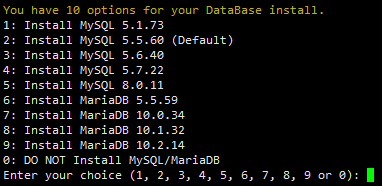
During the LNMP installation, you have the option to select the MySQL version:

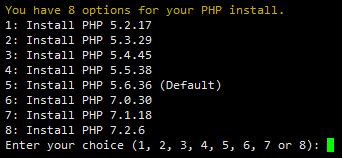
Option to select the PHP version

Enter your desired password when prompted:

Enter your desired password when prompted.

PHP version: 

Option to select the MySQL version

Upon completion of the installation process, the program will rewrite your firewall configuration to accept traffic on ports 80 and 443 for TCP connections. This step is crucial for allowing web traffic through the firewall.

Was this article helpful?
Dislike 0