You are here:

How to access your Mac mini Via DeskIn

What is DeskIn

DeskIn is a secure, high-performance remote desktop software designed to connect computers, tablets, and phones. It enables users to access files, work remotely, or play PC games on mobile devices with low latency (up to 4K 60FPS) and supports Windows, macOS, Android, and iOS.


Requirement

To ensure a successfully Remote Access, make sure you have the following prerequisites:

Step 1:

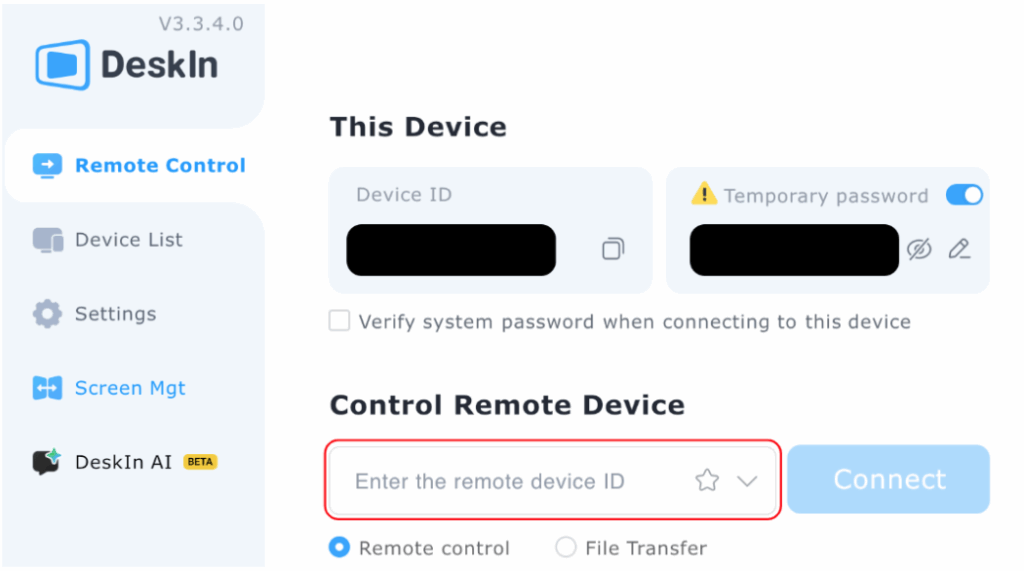
Open and log in to the DeskIn desktop app.

Step 2:

Navigate to the Control Remote Device field and input the target Device ID.

Step 3:

Select Connect button to begin your remote session.

Was this article helpful?
Dislike 0