

Choosing a Mac Cloud Provider is an important decision for businesses and developers who need reliable access to Apple hardware. A suitable service can support iOS development, application testing, software builds, and remote teamwork. However, monthly prices alone cannot show the full value of a hosting service. Uptime guarantees, network performance, security controls, and technical support also affect daily work. Understanding these factors helps businesses select a service that matches technical needs and available budgets.
1. Check the Uptime SLA
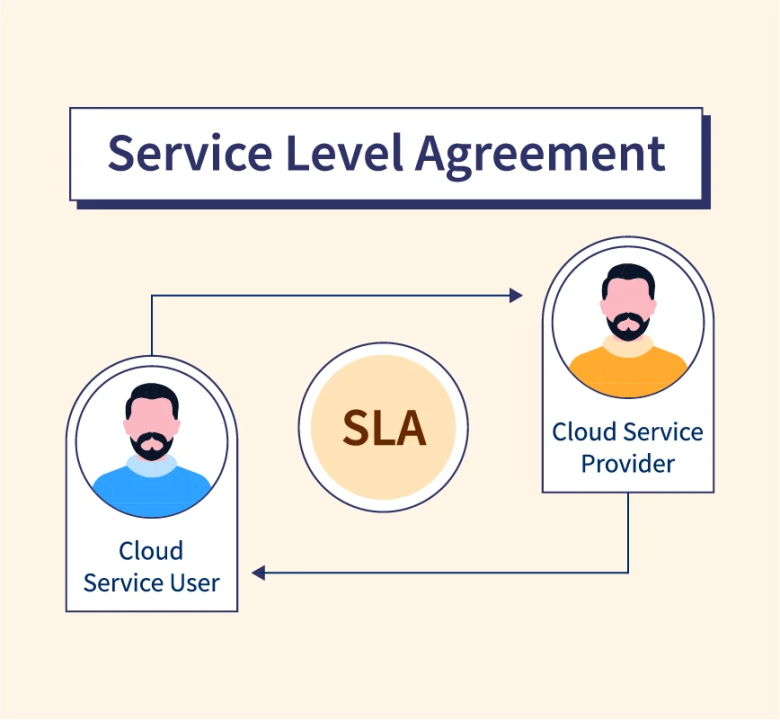
A service level agreement (SLA) explains the performance commitments made by a hosting company. A reliable Mac Cloud Provider should publish clear uptime targets and explain how availability is measured. An uptime percentage shows how often a service is expected to remain accessible during a specific period.
For example, a 99.9% monthly uptime target allows approximately 43 minutes of downtime in a 30-day month. A higher percentage generally means less permitted downtime. However, the calculation method and exclusions can differ between providers.
Before selecting a plan, check the conditions that apply when an outage occurs. Some agreements offer service credits when availability falls below the promised level. Other agreements exclude scheduled maintenance or certain network failures. A clear SLA helps businesses understand the actual commitment rather than relying on marketing claims.
2. Evaluate Network Speeds
Network performance affects remote access, file transfers, software downloads, and application testing. A Mac Cloud Provider should provide useful information about network capacity, connectivity, and expected performance.
Bandwidth measures the amount of data that can travel through a connection. Latency measures the time required for data to travel between two points. Both factors matter when accessing a remote Mac through a graphical interface or transferring large development files.
Low latency supports smoother remote sessions. Sufficient bandwidth helps reduce delays during large uploads and downloads. Developers should also check whether the hosting location is close to the main working team. A nearby data centre may provide a more responsive connection, although routing and internet conditions also affect performance.
Network speed claims should include meaningful measurements. A Mac Cloud Provider that explains bandwidth limits, connection policies, and traffic restrictions makes service comparisons easier. Testing a trial instance can provide a more realistic view of performance before a long-term commitment.
3. Review Security Features
Security protects source code, account credentials, customer information, and development files. A Mac Cloud Provider should offer suitable controls to prevent unauthorized access and reduce common security risks.
Strong account authentication is an important starting point. Multi-factor authentication adds another verification step beyond a password. Firewall rules can restrict network traffic to approved connections. Encrypted connections help protect information during remote access and file transfers.
Access permissions also deserve attention. Each account should receive only the permissions required for its assigned tasks. Separate user accounts make activity easier to track and reduce the risks associated with shared credentials.
The United Kingdom’s National Cyber Security Centre provides practical guidance on choosing a cloud provider. This resource explains why security claims, operational processes, and supporting evidence matter when assessing cloud services.
A Mac Cloud Provider should also explain how operating system updates, backups, incident handling, and data removal are managed. Clear policies help businesses understand which responsibilities belong to the hosting company and which remain with the customer.
4. Understand the Hardware and Resources
Mac hosting plans can differ in processor generation, memory, storage capacity, and hardware access. These differences affect build times and the number of development tasks that can run efficiently.
A Mac Cloud Provider should describe the available Mac models and the resources included in each plan. Apple Silicon hardware may suit modern development workflows that require current macOS versions and Xcode. However, compatibility requirements should guide hardware selection rather than model names alone.
Memory capacity matters when compiling large projects or running several development tools at once. Solid-state storage supports responsive file access and project loading. Sufficient storage space also allows room for source code, build files, simulators, and testing resources.
Dedicated hardware may provide more predictable resource access than shared environments. Before choosing a plan, confirm whether processor resources are dedicated and whether hardware upgrades are available.
5. Check Remote Access and Developer Compatibility
Remote access determines how easily developers can work with hosted Mac hardware. A Mac Cloud Provider should support a secure connection method that fits the development workflow.
Remote desktop access can support graphical tools such as Xcode and the iOS Simulator. Secure Shell (SSH) can support command-line administration, automated scripts, and build processes. Reliable access methods help developers maintain productive workflows without keeping physical Mac computers in the office.
Compatibility is equally important. Check the supported macOS versions, available development tools, and restrictions on software installation. Additional details about running an iOS Simulator on a cloud-hosted Mac can help explain how remote Mac environments support application testing.
A Mac Cloud Provider should make setup instructions available and explain how remote access credentials are managed. Clear documentation can reduce setup delays and help technical teams resolve common connection issues.
6. Examine Technical Support
Technical problems can interrupt builds, testing, and release schedules. A Mac Cloud Provider should offer support channels that match the importance of the hosted workload.
Check whether assistance is available around the clock or only during business hours. Review the expected response time for urgent incidents. Response time and resolution time are different measures, so both deserve attention.
Useful support documentation should cover network troubleshooting, remote login, operating system issues, and hardware failures. An accessible status page can also help identify service interruptions without unnecessary support requests.
Businesses running time-sensitive release pipelines may benefit from faster incident response. Smaller development teams may prefer clear documentation and predictable support costs.
7. Compare Pricing and Contract Terms
A low advertised price does not always represent the lowest overall cost. A Mac Cloud Provider may charge additional fees for extra storage, bandwidth, backups, public IP addresses, or technical assistance.
Compare the complete monthly cost rather than the base rate alone. Check billing periods, minimum commitments, cancellation conditions, and refund policies. Confirm whether the advertised price includes the hardware resources required for the intended workload.
Flexible plans can help smaller teams control spending during quiet periods. Long-term contracts may offer different rates but can reduce flexibility when project requirements change.
A Mac Cloud Provider with transparent pricing makes budgeting easier and reduces unexpected expenses. Businesses should compare included features against actual development requirements before making a purchase.
8. Assess Reliability Before Committing
A trial period can reveal practical differences between hosting services. Test remote responsiveness, network stability, build performance, and access to essential development tools. Review the provider’s service history when public monitoring information is available.
A Mac Cloud Provider should provide enough technical information to support an informed decision. Hardware specifications, security policies, support commitments, and uptime records can help confirm whether the service meets operational requirements.
It is also useful to review backup procedures and recovery options. Backups should have clear retention periods and restoration instructions. Important project files should remain protected even when a hosting service experiences unexpected problems.
Conclusion
Selecting a suitable Mac hosting service requires more than comparing monthly prices. A dependable Mac Cloud Provider should offer clear uptime commitments, responsive network connections, strong security controls, suitable hardware, and accessible technical support.
Careful evaluation helps businesses avoid unnecessary costs and reduce interruptions to development work. Reviewing contract terms, testing remote access, and checking security documentation can support a more confident decision. The right choice depends on workload requirements, budget limits, and the level of reliability needed for everyday development.