Setting Up a Website Environment Using LNMP Installation
Setting Up a Website Environment Using LNMP Installation
Installing CentOS (6.X or 7.X):
Begin by downloading the LNMP package and completing the installation.
wget http://soft.vpser.net/lnmp/lnmp1.5.tar.gz -cO lnmp1.5.tar.gz && tar zxf lnmp1.5.tar.gz && cd lnmp1.5 && ./install.sh lnmp
If the wget command is not found, you can install it first by using the following:
yum install wget
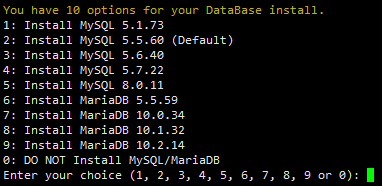
During the LNMP installation, you have the option to select the MySQL version:
Enter your desired password when prompted:
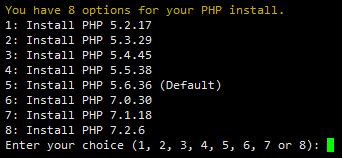
PHP version:
Upon completion of the installation process, the program will rewrite your firewall configuration to accept traffic on ports 80 and 443 for TCP connections. This step is crucial for allowing web traffic through the firewall.